How to Humanize AI Content For FREE: From the Best Free Prompt to a Repeatable System (A to Z)

Steph Morara
Updated: June 29, 2026
A comprehensive guide expanded into a full reference step by step guide for stripping AI fingerprints from your content.
- 01 Why AI Writing Sounds Like AI Writing
- 02 Why This Matters
- 03 The Core Prompt
- 04 Before and After: A Real Example
- 05 Annotated Breakdown: Why Each Rule Exists
- 06 Customizing the Prompt for Your Content Type
- 07 Teaching It Your Voice: The Writing Sample Method
- 08 Installing the Prompt: Every Major AI Tool
- 09 Fixing the Character Limit Problem
- 10 Testing Whether It Actually Worked
- 11 The Manual Editing Layer
- 12 Common AI Tells to Hunt for Manually
Why AI Writing Sounds Like AI Writing
Before fixing the problem, it helps to understand it.
Large language models predict the next likely word based on patterns in training data. Three properties of that process create the telltale "AI voice":
Human writing naturally mixes short and long sentences. AI models tend toward uniform sentence length and rhythm, which reads as flat or robotic even when grammatically perfect.
Models gravitate toward statistically common phrasing. That is why so much AI text leans on the same handful of words: delve, unlock, realm, tapestry, navigate, landscape. These words are not wrong. They are just overused, because they are the path of least statistical resistance.
Models default to certain formatting patterns: bolded keywords, bullet lists for everything, em dashes as a universal connector, a tidy "in conclusion" wrap-up. None of these are inherently bad. The problem is consistency. Real writers vary their structure depending on mood, audience, and platform. AI defaults to the same shape every time unless told otherwise.
None of this means AI-generated text is bad. It means raw, unedited AI output has a fingerprint, and that fingerprint is now recognizable to readers, recruiters, and detection tools alike. Humanizing it is the process of breaking that fingerprint.
Why This Matters
Three concrete reasons to care about this, beyond aesthetics:
Readers disengage.
Robotic phrasing, excessive emojis, and hype language ("game-changer," "revolutionize") trigger skepticism. People scroll past it because it pattern-matches to spam or low-effort content.
Platforms may suppress it.
Several social platforms have signaled that algorithmically generated, low-effort content gets reduced reach. Even where this isn't explicitly confirmed, lower engagement on AI-sounding posts feeds the same outcome organically.
AI detectors exist, even if imperfect.
Tools like GPTZero, Originality.ai, and Copyleaks are used by schools, publishers, and some employers. They aren't reliable enough to be the final word on anything, but a flagged piece can still cost you a grade, a byline, or a client's trust before anyone has a chance to argue the tool was wrong.
The goal of humanizing AI writing isn't to "trick" anything. It's to remove the predictable artifacts so what's left sounds like a person who has a point of view, wrote it with intent, and varied their sentences the way people actually do.
The Core Prompt
This is the free prompt at the center of this method. It works with any LLM (ChatGPT, Claude, Gemini, etc.) appended to a writing request, or saved as a standing custom instruction.
# FOLLOW THIS WRITING STYLE:

• SHOULD use clear, simple language.
• SHOULD be spartan and informative.
• SHOULD use short, impactful sentences.
• SHOULD use active voice; avoid passive voice.
• SHOULD focus on practical, actionable insights.
• SHOULD use bullet point lists in social media posts.
• SHOULD use data and examples to support claims when possible.
• SHOULD use "you" and "your" to directly address the reader.
• AVOID using em dashes (—) anywhere in your response. Use only commas, periods, or other standard punctuation. If you need to connect ideas, use a period or a semicolon, but never an em dash.
• AVOID constructions like "...not just this, but also this".
• AVOID metaphors and clichés.
• AVOID generalizations.
• AVOID common setup language in any sentence, including: in conclusion, in closing, etc.
• AVOID output warnings or notes, just the output requested.
• AVOID unnecessary adjectives and adverbs.
• AVOID hashtags.
• AVOID semicolons.
• AVOID markdown.
• AVOID asterisks.
• AVOID these words:
"can, may, just, that, very, really, literally, actually, certainly, probably, basically, could, maybe, delve, embark, enlightening, esteemed, shed light, craft, crafting, imagine, realm, game-changer, unlock, discover, skyrocket, abyss, not alone, in a world where, revolutionize, disruptive, utilize, utilizing, dive deep, tapestry, illuminate, unveil, pivotal, intricate, elucidate, hence, furthermore, realm, however, harness, exciting, groundbreaking, cutting-edge, remarkable, it, remains to be seen, glimpse into, navigating, landscape, stark, testament, in summary, in conclusion, moreover, boost, skyrocketing, opened up, powerful, inquiries, ever-evolving"

# IMPORTANT: Review your response and ensure no em dashes!
This is a starting point, not a finished system. Treat it as the foundation you build your own voice on top of.
Before and After: A Real Example
A simple test: ask ChatGPT, with no memory or saved preferences (a fresh incognito session), to write a viral LinkedIn post about a new AI feature.
- Em dashes used as a default connector
- Markdown bolding scattered through every other line
- Excessive emojis
- Hashtags at the end (which don't function the way they do on Twitter/Instagram, and read as dated on LinkedIn)
- Hyperbolic, marketing-style claims with little specific detail
- A more direct opening line, no preamble
- Clean bullet points instead of dense paragraphs
- No markdown formatting
- Far fewer em dashes
- Concrete, specific phrasing instead of generic hype
The difference is not subtle. It is the difference between a post that reads like marketing copy generated in ten seconds and one that reads like a person explaining something they actually understand.
Annotated Breakdown: Why Each Rule Exists
The prompt above is a list of instructions. Here is what each cluster of rules is actually fixing.
"SHOULD use clear, simple language" / "SHOULD be spartan and informative"
This counteracts the model's tendency to dress up simple ideas in elevated vocabulary. AI defaults to sounding "smart" through word choice rather than through clarity. Spartan writing sounds confident. Padded writing sounds like it's trying to convince you of something.
"SHOULD use short, impactful sentences" / "SHOULD use active voice"
Passive voice and long compound sentences are common in AI output because they're statistically safe constructions. Active voice forces a clear subject and action, which is closer to how people actually talk.
"AVOID using em dashes"
This is the single most recognizable AI tell in 2025-2026 writing. Models default to em dashes for almost any clause connection. Banning them forces the model to choose a period, comma, or semicolon, each of which carries different rhythm and meaning, instead of defaulting to one universal tool.
"AVOID constructions like 'not just this, but also this'"
This is a specific rhetorical pattern models overuse because it sounds rhetorically polished while saying very little. It's a hedge disguised as emphasis.
"AVOID metaphors and clichés" / "AVOID generalizations"
Models often reach for a metaphor (tapestry, journey, landscape) instead of a specific, concrete detail. A metaphor papers over the absence of a real example. Cutting it forces specificity.
"AVOID common setup language... in conclusion, in closing"
These phrases signal "I am an essay-writing machine following an essay template," because that is literally what they are doing. Humans rarely announce that they are concluding; they just conclude.
"AVOID these words" (the banned list)
Every word on this list (delve, unlock, realm, harness, game-changer, tapestry, etc.) is a high-frequency AI tell, not because the words are bad in isolation, but because the model reaches for them constantly across totally unrelated topics. Their overuse, not their existence, is the problem.
"AVOID markdown / asterisks"
Bold text and bullet-heavy formatting are easy for a model to generate and look organized, but most platforms (LinkedIn, email, Twitter/X) either don't render markdown or render it as raw asterisks. It's a tell that the text was copy-pasted straight from a chat window.
The final reminder line
Models frequently violate their own instructions partway through a long response. Telling the model to re-check its own output before finalizing measurably reduces the number of em dashes and banned words that slip through.
Customizing the Prompt for Your Content Type
The default prompt is tuned for direct-response marketing and social copy. If you're writing something else, adjust accordingly.
| Content type | What to remove | What to add |
|---|---|---|
| Blog posts / articles | "SHOULD use bullet point lists in social media posts" | Permission for longer paragraphs; instruction to vary sentence length deliberately |
| Academic or technical writing | "SHOULD be spartan," informal "you/your" address | Instruction to retain necessary technical terms even if they appear in the banned list |
| Hashtag/social-specific rules | A line about sign-off tone matching the relationship (colleague vs. cold outreach) | |
| Fiction / creative writing | Most of the "spartan" and "actionable insights" rules | Instruction to vary tone by character or scene, and explicit permission for figurative language |
| Technical documentation | Soften "AVOID metaphors" since analogies often aid technical clarity | Instruction to prioritize precision over personality |
If you only remember one customization rule: the more formal or technical the content, the more of the "marketing voice" instructions you should strip out. The banned-word list and em dash rule are useful almost everywhere. The "spartan, bullet-heavy, direct address" instructions are specific to sales and social content.
Teaching It Your Voice: The Writing Sample Method
The prompt removes AI tells. It does not, by itself, make text sound like you specifically. For that, append a writing sample.
Pick 300 to 800 words of writing you've done that you're proud of: an email, a post, a section of something you wrote without AI assistance.
Add this line after the prompt:
# MATCH THIS VOICE:
Below is a sample of my own writing. Match its tone, sentence rhythm, and vocabulary level, not its specific topic.

[paste your sample here]
Ask the model to summarize, in its own words, what it notices about your voice (sentence length, formality, humor, specific phrases you repeat) before generating new content. This forces it to actually use the sample rather than skim past it.
Update the sample periodically. As your writing evolves, or as you collect better examples, swap in fresher ones.
This step matters more than people expect. Two writers using the identical banned-word list will still sound different from each other once a real writing sample is in the mix, because the sample captures things a rule list cannot: how long you let an idea breathe, whether you ask rhetorical questions, how often you use humor.
Installing the Prompt: Every Major AI Tool
Pasting the prompt every time works, but saving it as a standing instruction is faster and more consistent. Here's how to do it in the major tools.
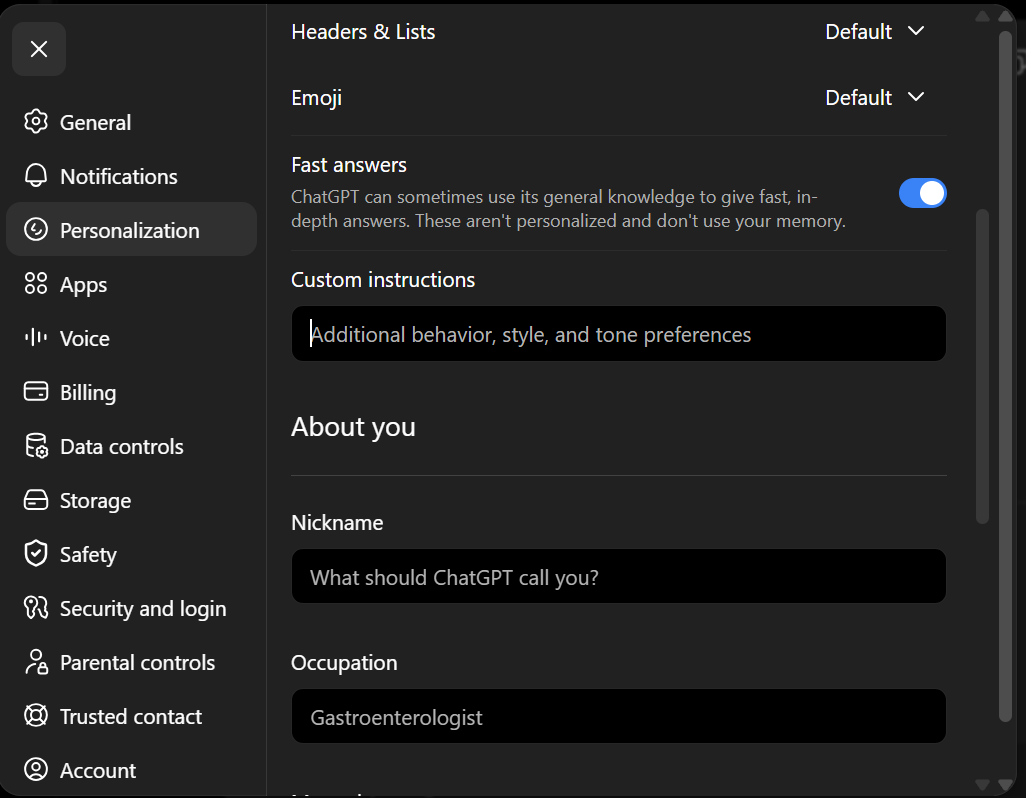
- Click your profile name (bottom left) → Personalization
- Paste the prompt into custom instructions ("Additional behavior, style and tone preferences")
- Trim if needed (see character limit section below)
- Save, then start a new conversation to test it
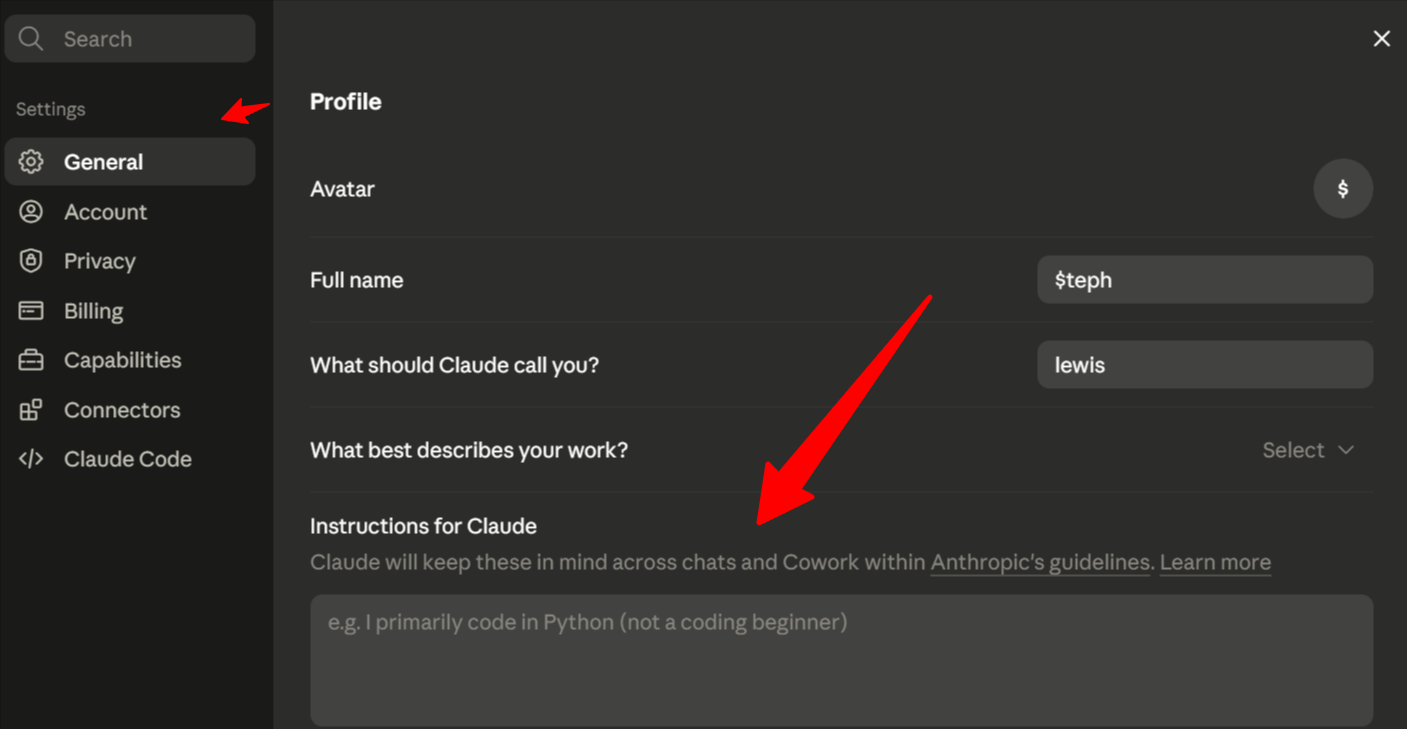
- Go to Settings → General
- Find "Instructions for Claude"
- Paste the prompt (Claude's limit is generous, but keep it tight regardless)
- Save and test in a new conversation
- For project-specific voice, use Claude Projects and put the prompt plus a writing sample in the Project's custom instructions
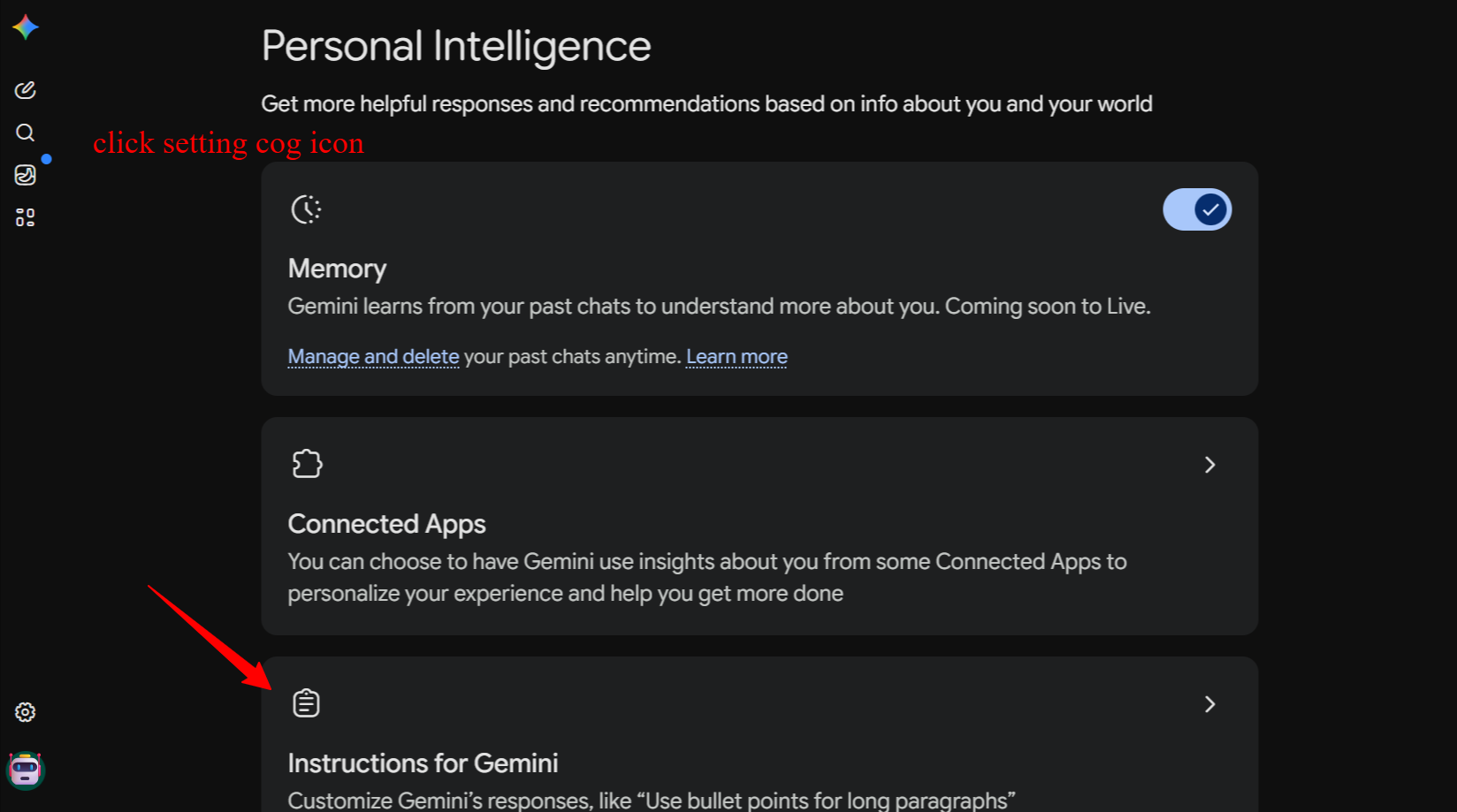
- Open Gemini → Settings → Personal Intelligence, or build a custom Gem with the prompt as its system instructions
- Gems are useful here because you can make one Gem specifically for "humanized LinkedIn posts" and another for "humanized blog drafts"
If you're building a GPT for repeated use (e.g., a content team uses it daily), put the prompt in the GPT's Instructions field rather than relying on each person's personal custom instructions. This guarantees consistency across a team regardless of individual settings.
If you're building this into a product or internal tool, the same text goes in the system parameter of your API call. This is the most reliable place to put it because it can't be accidentally cleared by a user clearing their chat history or preferences.
Fixing the Character Limit Problem
Some platforms or custom instruction boxes cap your input length (for example, ChatGPT's custom instructions historically limit you to 1,500 characters). If the full core prompt gets cut off, use this highly condensed, high-impact version instead:
Use clear, simple language. Short, active-voice sentences. Practical and specific, not generalized.
Avoid em dashes entirely; use periods or commas instead.
Avoid metaphors, clichés, and setup phrases like "in conclusion."
Avoid markdown, asterisks, hashtags, and semicolons.
Avoid these words: delve, unlock, realm, tapestry, harness, navigate, landscape, game-changer, revolutionize, disruptive, cutting-edge, groundbreaking, utilize, elucidate, furthermore, moreover, however, certainly, basically, literally, actually.
Before finishing, check your response for em dashes and remove any you find.
This trims roughly 60% of the original length while keeping the three rules that catch the most obvious tells: no em dashes, no markdown, no banned-word soup. If your platform allows the full version, use it. If not, this is the version to save.
Testing Whether It Actually Worked
Don't just eyeball it. Run a quick check.
Manual checklist (takes under a minute):
- Count the em dashes. Zero or one is good. Three or more means the prompt didn't fully take.
- Scan for any word from the banned list. A single tool like Find & Replace in a doc editor works fine for this.
- Read the first and last sentence out loud. If either sounds like a TED talk opener or a graduation speech closer, revise it manually.
- Check sentence length variation. If every sentence is roughly the same length, that's still a tell, even with no banned words present.
AI detection tools (use with caution):
- GPTZero and Originality.ai are the two most commonly referenced in publishing and education contexts.
- Copyleaks is used by some institutions for plagiarism plus AI detection combined.
AI Detector Comparison: 2026 Industry Benchmarks
| Detector | Raw AI Detection | False Positive | Pricing | Best For |
|---|---|---|---|---|
| Originality.ai | ~96.2% | Low (~3.8%) | From $14.95/mo | SEO teams, publishers |
| Copyleaks | ~93.4% | Low (~4.2%) | From $7.99/mo | Multilingual, code |
| GPTZero | ~84.7% | Moderate (~8.6%) | Free tier; Paid from $8.33/mo | Educators, quick checks |
| ZeroGPT | ~74.1% | High (~16.2%) | Free; Paid $9.99/mo | Budget, no-signup |
The "Humanized Text" Asterisk: When raw AI text is run through a systematic humanization prompt or manual editing workflow, the detection rate across all of the tools listed above falls precipitously to between 2% and 8%. The tools are trained to recognize patterns, not origin. If you break the mathematical patterns, the detector cannot flag it reliably.
Important caveat: these tools have documented false-positive rates, especially on text written by non-native English speakers or text that's simply very clean and well-structured. A "likely AI" flag is a signal to review, not a verdict to panic over. Use detectors as a second opinion after your own read-through, not as the primary judge.
The Manual Editing Layer: What No Prompt Can Fix
A prompt changes vocabulary and surface-level structure. It can't replicate the things that make writing feel lived-in. After running the prompt, spend five minutes doing this by hand:
Add one specific, real detail.
A number, a date, a name, an actual result. AI text defaults to the general; a single concrete detail does more to humanize a paragraph than any rule list.
Break a rule on purpose, once.
If every sentence is short, let one run a little longer. Real writing has irregular rhythm. Perfectly uniform "short, punchy sentences" is its own kind of tell once you notice it.
Read it out loud.
If you stumble on a phrase or it sounds like something nobody would actually say to a friend, rewrite it.
Cut the safest sentence in the piece.
AI output often includes one sentence that says nothing risky and adds nothing specific, usually near the top or bottom. It's almost always safe to delete.
Common AI Tells to Hunt for Manually
Beyond the banned-word list, watch for these patterns, which the prompt doesn't fully catch:
Starting multiple paragraphs with "Additionally," "Moreover," or "Furthermore" even when you've banned the words individually
Ending a piece with a rhetorical question that wasn't earned by the rest of the text
A three-item list where the items are all roughly the same length and structure
Over-explaining a point that didn't need explaining, often right after making it well the first time
A sudden shift to second person ("you might be wondering...") used as a transition device rather than because it serves the reader
FAQ
Does this prompt fool AI detectors?
Sometimes, but that's not really the goal, and treating it as the goal is a mistake. The prompt removes statistically common AI patterns, which can lower a detector's confidence score. But detectors are imperfect in both directions: some heavily-edited human writing gets flagged, and some AI writing passes clean. Use this prompt to make your writing genuinely better and less repetitive, not as a way to launder text past a checker.
Why does it keep using one specific banned word no matter what I do?
Some words are so deeply weighted in a model's training data for certain topics that a single ban in a list of forty other words doesn't fully suppress them. If one specific word keeps slipping through, add a dedicated, isolated instruction just for that word: "Never use the word 'chaos' under any circumstances, in any context." Putting it on its own line, separate from the long list, often works better than burying it among thirty others.
Should I use this for every single thing I write?
No. Use it for content where AI tells genuinely cost you something: public posts, marketing copy, anything graded or evaluated, anything sent to a client. For private notes, brainstorming, or first drafts you'll heavily rewrite anyway, raw AI output is fine.
Does removing em dashes go too far, since real writers use them too?
Yes, real writers use em dashes. The instruction isn't "em dashes are bad," it's a forcing function: because the model defaults to overusing them so heavily, an outright ban is the easiest way to get back to a more natural ratio. If you personally like and use em dashes in your own writing, feel free to soften this rule and allow one or two per piece instead of zero.
Can I combine this with a dedicated humanizer tool?
Yes. Tools that specifically rewrite AI text for "humanization" exist, but most of what they do is apply rules similar to this prompt, plus sentence-restructuring. Using this prompt at generation time and skipping a paid tool entirely works for most use cases. If you're optimizing heavily for detector scores specifically, a dedicated tool plus manual editing may add marginal value on top.
Quick Reference Checklist
Before publishing anything that started as AI output:
Resources
The core prompt is reproduced as published feel free to refine and copy; the surrounding framework, customizations, and FAQ are expansions for a more complete reference.